
owntag’s IP Anonymization shortens or replaces your visitors’ IP addresses before a request reaches your Server Side GTM Container. The full IP address never enters the container, so no tag can pass it on — neither Google’s tags nor anyone else’s.
Anonymization modes
You choose how much of the IP address your container gets to see:
| Mode | What happens | IPv4 example | IPv6 example |
|---|---|---|---|
| Standard | Removes the last octet (IPv4) or the last 80 bits (IPv6) | 203.0.113.42 → 203.0.113.0 | 2001:db8:85a3:8d3:1319:8a2e:370:7348 → 2001:db8:85a3:: |
| Strict | Removes the last two octets (IPv4) or the last 96 bits (IPv6) | 203.0.113.42 → 203.0.0.0 | 2001:db8:85a3:8d3:1319:8a2e:370:7348 → 2001:db8:: |
| Country | Replaces the IP address with a fixed IP address from the same country | Any German IPv4 address → one fixed German IPv4 address | Any German IPv6 address → one fixed German IPv6 address |
Which mode should you choose?
- Standard mirrors the partial redaction that Google tags used until January 11, 2027. Vendors can still determine the approximate region of your visitors.
- Strict leaves vendors with a very rough location, typically no more than the country.
- Country leaves vendors with the country and nothing else. Every visitor from the same country reaches your container with the same IPv4 address, or with the same IPv6 address if they use IPv6.
Which mode fits your legal requirements is a question for your data protection officer. owntag gives you the technical means, but can’t make that call for you.
How ‘Country’ mode picks its IP addresses
The visitor’s country is determined with the same local database that powers Geolocation. owntag then swaps the IP address for a fixed address from that country: an IPv4 address for visitors with an IPv4 address, an IPv6 address for visitors with an IPv6 address. Your vendors see the same IP version the browser used. The replacement addresses come from large address ranges assigned to the respective country, so vendors locate them correctly.
A few things to keep in mind:
- All visitors from one country share one IPv4 address and one IPv6 address. Vendors that use the IP address to tell visitors apart, for example to match conversions or to detect invalid traffic, lose that signal.
- If owntag can’t determine the country of an IP address, or has no address of the same IP version for that country, it falls back to the Strict mode for that request.
- The country detection is as accurate as IP geolocation in general: very reliable, but not perfect.
Affected HTTP headers
| Header | With IP Anonymization enabled |
|---|---|
x-owntag-userip | Contains the anonymized IP address |
X-Forwarded-For, Forwarded, X-Envoy-External-Address | Contain the anonymized IP address. SGTM determines the visitor’s IP address from headers like these. |
X-Real-IP, X-Client-IP, X-Cluster-Client-IP, X-Original-Forwarded-For, True-Client-IP, CF-Connecting-IP, CF-Connecting-IPv6, CF-Pseudo-IPv4, Fastly-Client-IP | Only present if a proxy or CDN in front of owntag adds them, for example a Cloudflare Worker. The IP addresses in them are anonymized the same way. If a header contains something other than IP addresses, owntag removes it. |
Impact on your analytics: Reporting on user location will become less precise in Google Analytics and similar tools. Make sure you check your data requirements before redacting the IP address here.
Setting up IP Anonymization
Step 1: Enable the feature
In the owntag console, open your container and select IP Anonymization in the sidebar. Toggle the feature on.
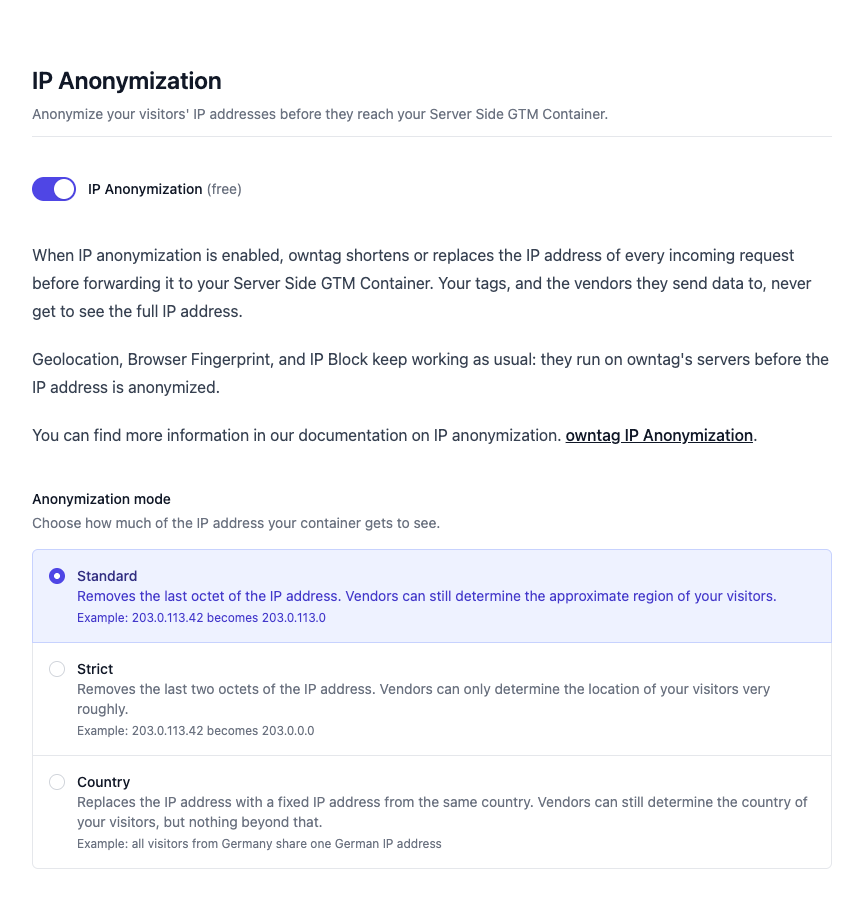
Step 2: Choose a mode
Select Standard, Strict, or Country. owntag saves your choice right away, and it takes effect within about 30 seconds.
Step 3: Verify
Enter Preview Mode in your SGTM container and send a request, for example by loading a page of your website. Then check the incoming request:
- The request header
x-owntag-useripshows the anonymized IP address. - In the event data,
ip_overrideshows the anonymized IP address as well.
Good to know
- Geolocation stays exact. owntag determines the country before it anonymizes the IP address, so
x-owntag-usercountryis as accurate as before. If a vendor needs the country, you can send it as a separate parameter. - Only request headers are anonymized. If your website or app sends an IP address as part of the request itself, for example as an event parameter or in a Measurement Protocol request, owntag passes it on unchanged.
- Consent is still your responsibility. IP Anonymization reduces the data your vendors receive. It doesn’t replace your consent setup.